

Athena
Introduction
Section titled “Introduction”Athena is an interactive query service provided by Amazon Web Services (AWS) that enables you to analyze data stored in S3 using standard SQL queries. Athena allows users to create ad-hoc queries to perform data analysis, filter, aggregate, and join datasets stored in S3. It supports various file formats, such as JSON, Parquet, and CSV, making it compatible with a wide range of data sources.
LocalStack allows you to configure the Athena APIs with a Hive metastore that can connect to the S3 API and query your data directly in your local environment. The supported APIs are available on our API Coverage section, which provides information on the extent of Athena’s integration with LocalStack.
Getting started
Section titled “Getting started”This guide is designed for users new to Athena and assumes basic knowledge of the AWS CLI and our lstk aws command.
Start your LocalStack container using your preferred method. We will demonstrate how to create an Athena table and run a query against it in addition to reading the results with the AWS CLI.
Create an S3 bucket
Section titled “Create an S3 bucket”You can create an S3 bucket using the mb command.
Run the following command to create a bucket named athena-bucket:
lstk aws s3 mb s3://athena-bucketYou can create some sample data using the following commands:
echo "Name,Service" > data.csvecho "LocalStack,Athena" >> data.csvYou can upload the data to your bucket using the cp command:
lstk aws s3 cp data.csv s3://athena-bucket/data/Create an Athena table
Section titled “Create an Athena table”You can create an Athena table using the CreateTable API
Run the following command to create a table named athena_table:
lstk aws athena start-query-execution \ --query-string "create external table tbl01 (name STRING, surname STRING) ROW FORMAT DELIMITED FIELDS TERMINATED BY ',' LOCATION 's3://athena-bucket/data/';" --result-configuration "OutputLocation=s3://athena-bucket/output/"{ "QueryExecutionId": "593acab7"}You can retrieve information about the query execution using the GetQueryExecution API.
Run the following command:
lstk aws athena get-query-execution --query-execution-id 593acab7Replace 593acab7 with the QueryExecutionId returned by the StartQueryExecution API.
Get output of the query
Section titled “Get output of the query”You can get the output of the query using the GetQueryResults API.
Run the following command:
lstk aws athena get-query-results --query-execution-id 593acab7You can now read the data from the tbl01 table and retrieve the data from S3 that was mentioned in your table creation statement.
Run the following command:
lstk aws athena start-query-execution \ --query-string "select * from tbl01;" --result-configuration "OutputLocation=s3://athena-bucket/output/"You can retrieve the execution details similarly using the GetQueryExecution API using the QueryExecutionId returned by the previous step.
You can copy the ResultConfiguration from the output and use it to retrieve the results of the query.
Run the following command:
lstk aws s3 cp s3://athena-bucket/output/593acab7.csv .cat 593acab7.csvReplace 593acab7.csv with the path to the file that was present in the ResultConfiguration of the previous step.
You can also use the GetQueryResults API to retrieve the results of the query.
Delta Lake Tables
Section titled “Delta Lake Tables”LocalStack Athena supports Delta Lake, an open-source storage framework that extends Parquet data files with a file-based transaction log for ACID transactions and scalable metadata handling.
To illustrate this feature, we take a sample published in the AWS blog.
The Delta Lake files used in this sample are available in a public S3 bucket under s3://aws-bigdata-blog/artifacts/delta-lake-crawler/sample_delta_table.
For your convenience, we have prepared the test files in a downloadable ZIP file here.
We start by downloading and extracting this ZIP file:
mkdir /tmp/delta-lake-sample; cd /tmp/delta-lake-samplewget https://localstack-assets.s3.amazonaws.com/aws-sample-athena-delta-lake.zipunzip aws-sample-athena-delta-lake.zip; rm aws-sample-athena-delta-lake.zipWe can then create an S3 bucket in LocalStack using the lstk aws command line, and upload the files to the bucket:
lstk aws s3 mb s3://testlstk aws s3 sync /tmp/delta-lake-sample s3://testNext, we create the table definitions in Athena:
lstk aws athena start-query-execution \ --query-string "CREATE EXTERNAL TABLE test (product_id string, product_name string, \ price bigint, currency string, category string, updated_at double) \ LOCATION 's3://test/' TBLPROPERTIES ('table_type'='DELTA')"Please note that this query may take some time to finish executing.
You can observe the output in the LocalStack container (ideally with DEBUG=1 enabled) to follow the steps of the query execution.
Finally, we can now run a SELECT query to extract data from the Delta Lake table we’ve just created.
To query Delta Lake tables, specify Catalog=deltalake in the QueryExecutionContext:
queryId=$(lstk aws athena start-query-execution \ --query-string "SELECT * FROM test" \ --query-execution-context "Database=default,Catalog=deltalake" \ --result-configuration "OutputLocation=s3://test/output/" | jq -r .QueryExecutionId)lstk aws athena get-query-results --query-execution-id $queryIdThe query should yield a result similar to the output below:
... "Rows": [ { "Data": [ { "VarCharValue": "product_id" }, { "VarCharValue": "product_name" }, { "VarCharValue": "price" }, { "VarCharValue": "currency" }, { "VarCharValue": "category" }, { "VarCharValue": "updated_at" } ] }, { "Data": [ { "VarCharValue": "00005" }, { "VarCharValue": "USB charger" }, { "VarCharValue": "50" }, { "VarCharValue": "INR" }, { "VarCharValue": "Electronics" }, { "VarCharValue": "1653462374.9975588" } ] }, ......Iceberg Tables
Section titled “Iceberg Tables”The LocalStack Athena implementation also supports Iceberg tables.
You can define an Iceberg table in Athena using the CREATE TABLE statement, as shown in the example below:
CREATE TABLE mytable (c1 integer, c2 string, c3 double)LOCATION 's3://mybucket/prefix/' TBLPROPERTIES ( 'table_type' = 'ICEBERG' )To query Iceberg tables, specify Catalog=iceberg in the QueryExecutionContext:
lstk aws athena start-query-execution \ --query-string "SELECT * FROM mytable" \ --query-execution-context "Database=default,Catalog=iceberg" \ --result-configuration "OutputLocation=s3://mybucket/output/"Once the table has been created and data inserted into it, you can see the Iceberg metadata and data files being created in S3:
s3://mybucket/_tmp.prefix/s3://mybucket/prefix/data/00000-0-user1_20230212221600_cd8f8cbd-4dcc-4c3f-96a2-f08d4104d6fb-job_local1695603329_0001-00001.parquets3://mybucket/prefix/data/00000-0-user1_20230212221606_eef1fd88-8ff1-467a-a15b-7a24be7bc52b-job_local1976884152_0002-00001.parquets3://mybucket/prefix/metadata/00000-06706bea-e09d-4ff1-b366-353705634f3a.metadata.jsons3://mybucket/prefix/metadata/00001-3df6a04e-070d-447c-a213-644fe6633759.metadata.jsons3://mybucket/prefix/metadata/00002-5dcd5d07-a9ed-4757-a6bc-9e87fcd671d5.metadata.jsons3://mybucket/prefix/metadata/2f8d3628-bb13-4081-b5a9-30f2e81b7226-m0.avros3://mybucket/prefix/metadata/70de28f7-6507-44ae-b505-618d734174b9-m0.avros3://mybucket/prefix/metadata/snap-8425363304532374388-1-70de28f7-6507-44ae-b505-618d734174b9.avros3://mybucket/prefix/metadata/snap-9068645333036463050-1-2f8d3628-bb13-4081-b5a9-30f2e81b7226.avros3://mybucket/prefix/temp/S3 Tables
Section titled “S3 Tables”LocalStack Athena can query S3 Tables through Glue federated catalogs, mirroring the AWS workflow that bridges S3 Tables, Glue, and Athena into a single query path. This lets you point Athena at a table bucket and run SQL against the Iceberg tables it manages without copying data into a separate warehouse.
The flow is the same as on AWS:
- Create a table bucket and namespaces in S3 Tables.
- Register a Glue federated catalog (conventionally named
s3tablescatalog) that delegates metadata to S3 Tables. - Register an Athena data catalog with
Type=GLUEwhosecatalog-idparameter points to a specific table bucket via the federated catalog (s3tablescatalog/<bucket-name>). - Reference the Athena data catalog in
QueryExecutionContextwhen running queries.
Create S3 Tables resources
Section titled “Create S3 Tables resources”Create a table bucket and a namespace in S3 Tables. The bucket holds your Iceberg tables and the namespace organizes them.
lstk aws s3tables create-table-bucket --name athena-doc-bucket{ "arn": "arn:aws:s3tables:us-east-1:000000000000:bucket/athena-doc-bucket"}lstk aws s3tables create-namespace \ --table-bucket-arn arn:aws:s3tables:us-east-1:000000000000:bucket/athena-doc-bucket \ --namespace sales{ "tableBucketARN": "arn:aws:s3tables:us-east-1:000000000000:bucket/athena-doc-bucket", "namespace": [ "sales" ]}Register a Glue federated catalog
Section titled “Register a Glue federated catalog”Register a Glue catalog that federates to S3 Tables using the CreateCatalog API.
The catalog name s3tablescatalog matches the AWS convention used by Athena, EMR, and Redshift.
lstk aws glue create-catalog \ --name s3tablescatalog \ --catalog-input '{ "FederatedCatalog": { "Identifier": "arn:aws:s3tables:us-east-1:000000000000:bucket/*", "ConnectionName": "aws:s3tables" } }'You can verify the federated catalog with:
lstk aws glue get-catalogsRegister an Athena data catalog
Section titled “Register an Athena data catalog”Register an Athena data catalog that points at a specific table bucket using the CreateDataCatalog API.
The catalog-id parameter follows the format s3tablescatalog/<bucket-name> so that Athena routes queries through the federated catalog path.
lstk aws athena create-data-catalog \ --name s3tables-catalog \ --type GLUE \ --parameters "catalog-id=s3tablescatalog/athena-doc-bucket"Confirm the data catalog status:
lstk aws athena get-data-catalog --name s3tables-catalog{ "DataCatalog": { "Name": "s3tables-catalog", "Type": "GLUE", "Parameters": { "catalog-id": "s3tablescatalog/athena-doc-bucket" }, "Status": "CREATE_COMPLETE" }}Resolve metadata through the catalog
Section titled “Resolve metadata through the catalog”Once the data catalog is registered, Athena resolves S3 Tables namespaces as databases and S3 Tables as tables. List the databases exposed by the federated catalog:
lstk aws athena list-databases --catalog-name s3tables-catalog{ "DatabaseList": [ { "Name": "sales", "Parameters": { "createdBy": "000000000000", "ownerAccountId": "000000000000" } } ]}You can also describe a single namespace with GetDatabase:
lstk aws athena get-database \ --catalog-name s3tables-catalog \ --database-name salesRun queries via the federated catalog
Section titled “Run queries via the federated catalog”To query S3 Tables data from Athena, reference the data catalog name in the QueryExecutionContext.
The Catalog field maps to the Athena data catalog you registered, and Database maps to the S3 Tables namespace:
lstk aws athena start-query-execution \ --query-string "CREATE TABLE orders (id int, customer string, amount double) TBLPROPERTIES ('table_type' = 'ICEBERG')" \ --query-execution-context "Catalog=s3tables-catalog,Database=sales" \ --result-configuration "OutputLocation=s3://athena-doc-output/results/"Insert and read data using the same QueryExecutionContext:
lstk aws athena start-query-execution \ --query-string "INSERT INTO orders VALUES (1, 'alice', 100.0), (2, 'bob', 250.5)" \ --query-execution-context "Catalog=s3tables-catalog,Database=sales" \ --result-configuration "OutputLocation=s3://athena-doc-output/results/"lstk aws athena start-query-execution \ --query-string "SELECT * FROM orders ORDER BY id" \ --query-execution-context "Catalog=s3tables-catalog,Database=sales" \ --result-configuration "OutputLocation=s3://athena-doc-output/results/"You can also use the catalog-id reference (s3tablescatalog/<bucket-name>) directly in QueryExecutionContext.Catalog if you prefer not to register a named Athena data catalog.
Client configuration
Section titled “Client configuration”You can configure the Athena service in LocalStack with various clients, such as PyAthena, awswrangler, among others! Here are small snippets to get you started:
from pyathena import connect
conn = connect(    s3_staging_dir="s3://s3-results-bucket/output/",    region_name="us-east-1",    endpoint_url="http://localhost:4566",)cursor = conn.cursor()
cursor.execute("SELECT 1,2,3 AS test")print(cursor.fetchall())
import awswrangler as wrimport pandas as pd
ENDPOINT = "http://localhost:4566"DATABASE = "testdb"S3_BUCKET = "s3://s3-results-bucket/output/"
wr.config.athena_endpoint_url = ENDPOINTwr.config.glue_endpoint_url = ENDPOINTwr.config.s3_endpoint_url = ENDPOINTwr.catalog.create_database(DATABASE)df = wr.athena.read_sql_query("SELECT 1 AS col1, 2 AS col2, 3 AS col3", database=DATABASE)print(df)Resource Browser
Section titled “Resource Browser”The LocalStack Web Application provides a Resource Browser for Athena query execution, writing SQL queries, and visualizing query results. You can access the Resource Browser by opening the LocalStack Web Application in your browser, navigating to the Resources section, and then clicking on Athena under the Analytics section.
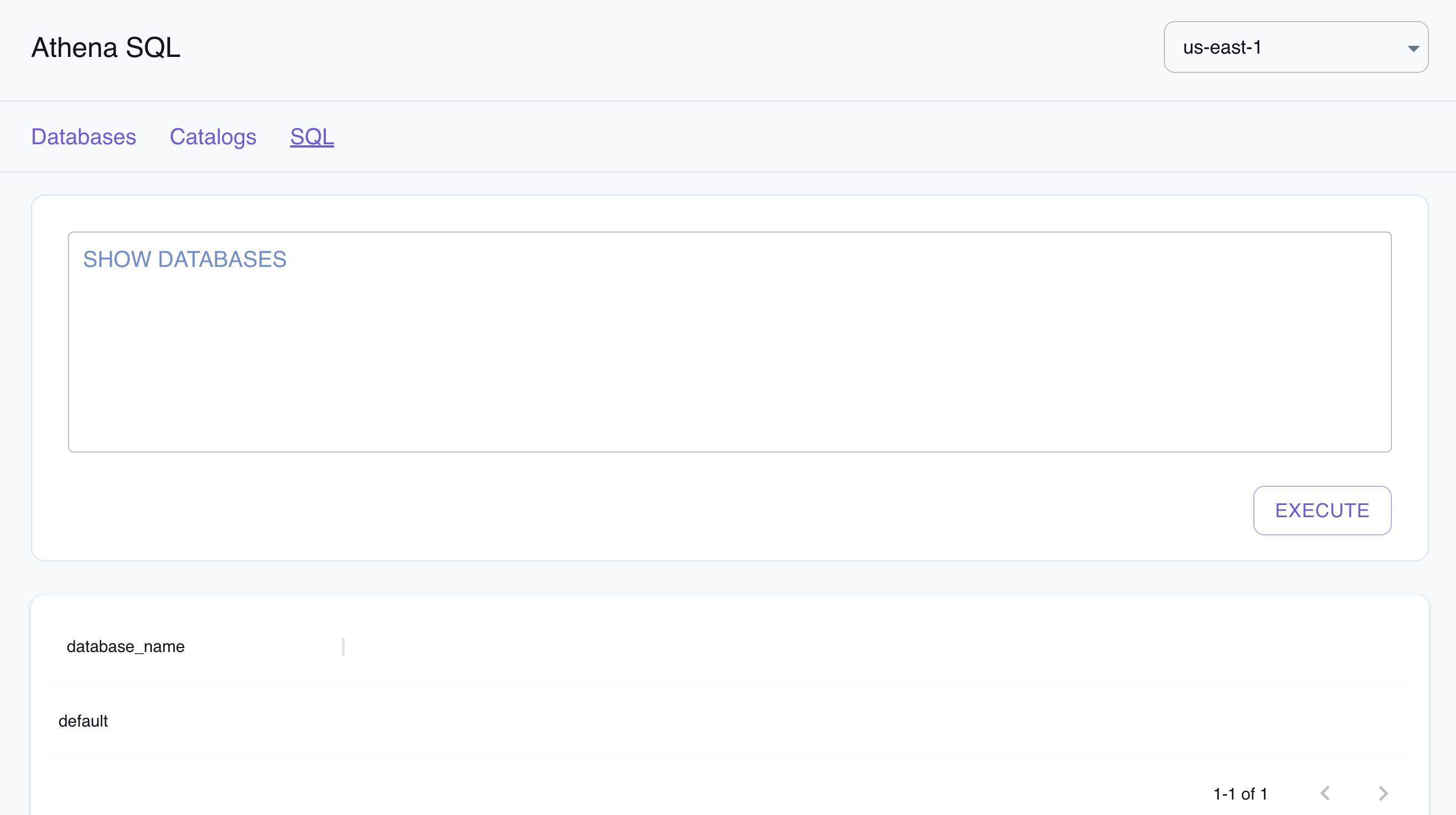
The Resource Browser allows you to perform the following actions:
- View Databases: View the databases available in your Athena instance by clicking on the Databases tab.
- View Catalogs: View the catalogs available in your Athena instance by clicking on the Catalogs tab.
- Edit Catalogs: Edit the catalogs available in your Athena instance by clicking on the Catalog name, editing the catalog, and then clicking on the Submit button.
- Create Catalogs: Create a new catalog by clicking on the Create Catalog button, entering the catalog details, and then clicking on the Submit button.
- Run SQL Queries: Run SQL queries by clicking on the SQL button, entering the query, and then clicking on the Execute button.
Examples
Section titled “Examples”The following code snippets and sample applications provide practical examples of how to use Athena in LocalStack for various use cases:
API Coverage
Section titled “API Coverage”| Operation ▲ | Implemented ▼ | Verified on Kubernetes |
|---|